Scan Date:Mar 28, 2025
Show More
ATTENTION!!! This version will be discontinued.
Please access the new versions from the following links:
* https://play.google.com/store/apps/details?id=com.lanuarasoft.windroid.free
* https://play.google.com/store/apps/details?id=com.lanuarasoft.windroid.full
---
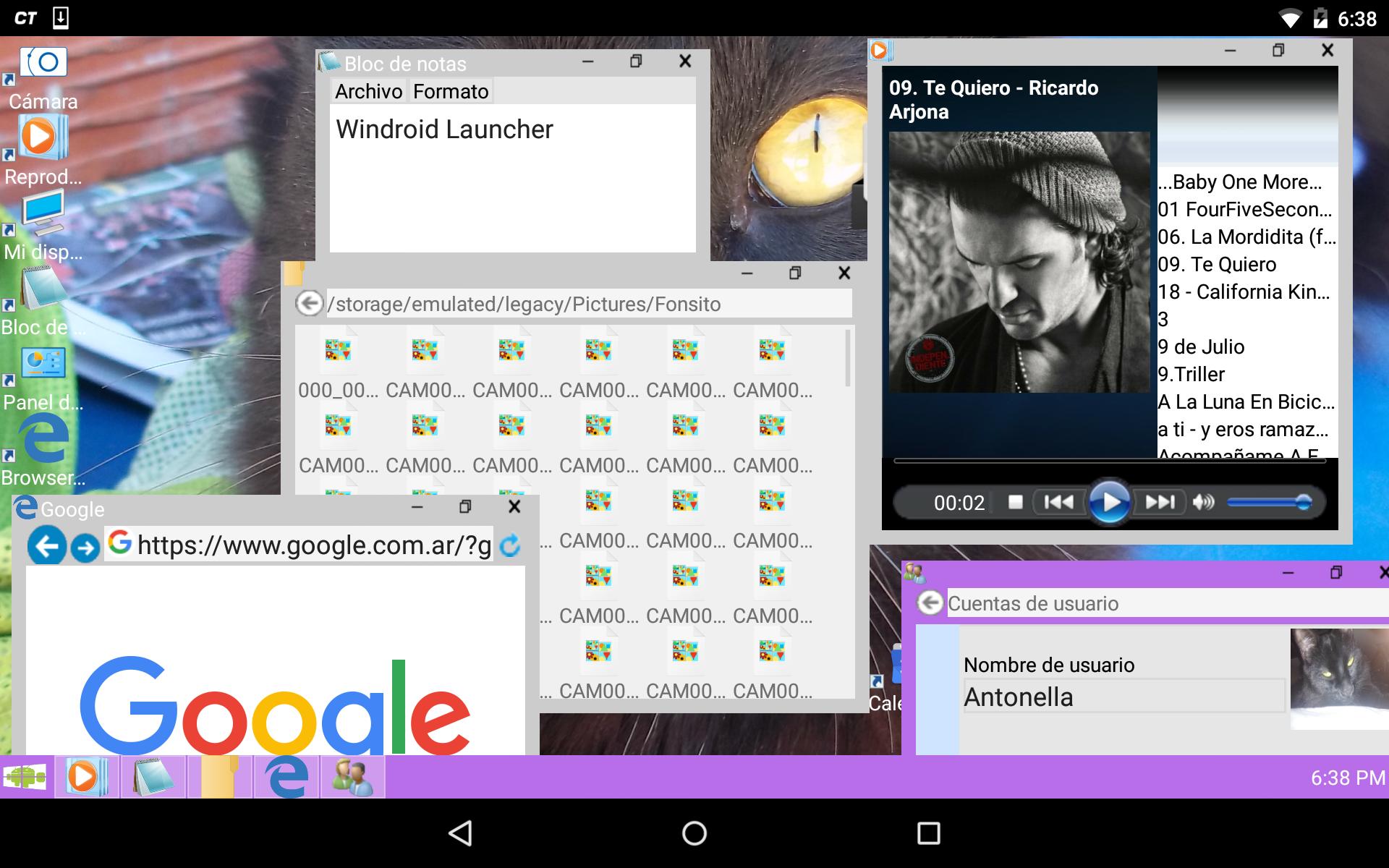
Windroid is a customizable launcher that includes its own applications capable of being displayed in windows even outside the application itself.
It also contains a taskbar and application launcher. It is comfortable, intuitive, fast and efficient. Thanks to multitasking support, you can run many native applications at the same time.
Anyway, if you like, it can be used with your favorite launcher as a simple app.
Windroid contains the following features:
-Customizable desktop: Place icons as you like, add Widgets and change the wallpaper with your favorite images. You can also choose the organization of your icons: Align in a grid or not align.
-File Browser. View the files on your device and run them by double clicking.
-Image viewer: View jpg, png, gif and bmp images. Zoom in to see the details of your images.
-Audio Player: Play all audio from your device in mp3, wma, ogg, wav, mid, midi, ACC and amr formats. (Depends on the codecs installed on the device)
-Web browser: Browse and explore web pages, even with Flash content (if installed on the device)
-Text editor: Edit and view simple text files in txt format.
-Photo Camera: Take photos directly from your desktop.
-ScreenLock: Prevent accidental touches. Allows the entry of a password.
TIPS:
*You can resize windows by dragging the bottom side, right side, or bottom right of the window. You can also maximize by double clicking on the title bar of the window.
For best precision, the resizing borders should be dragged on the outside of the window.
*To add an icon to the desktop, open the Windroid toolbar and drag an icon to the desktop.
*You can delete desktop icons by long clicking on the icon to delete.
*To launch applications from the desktop or from the file explorer, double click on an icon.
*You can change the username, username, wallpaper, and colors by going to Control Panel->Personalization.
*You can close or show open applications from the taskbar, by long clicking on the application icon.
*You can add Widgets by Long Clicking on the desktop and selecting "Add Widget"
Latest Version
3.2.0Uploaded by
Juaini
Requires Android
Android 2.3.2+
Category
Free Personalization AppContent Rating
Everyone
Security Report
Report
Flag as inappropriateLast updated on Feb 26, 2016
V3.2.0
-Grave bug en ScreenLocker, solo Android 2.X.X
-Correción de mas bugs Android 4.X.X
V3.1.9
-SCREENLOCKER
-Nuevas correcciones de bugs en Android 4.X.X (Gracias por los reportes de errores)





APKPure - A multi-platform app store primarily focused on Android, providing extensive app-related content. Discover the app you want easier, faster, and safer, with quick and efficient downloads and installations.