
With memory optimization, you can extend battery duration, and speed up the smartphone.
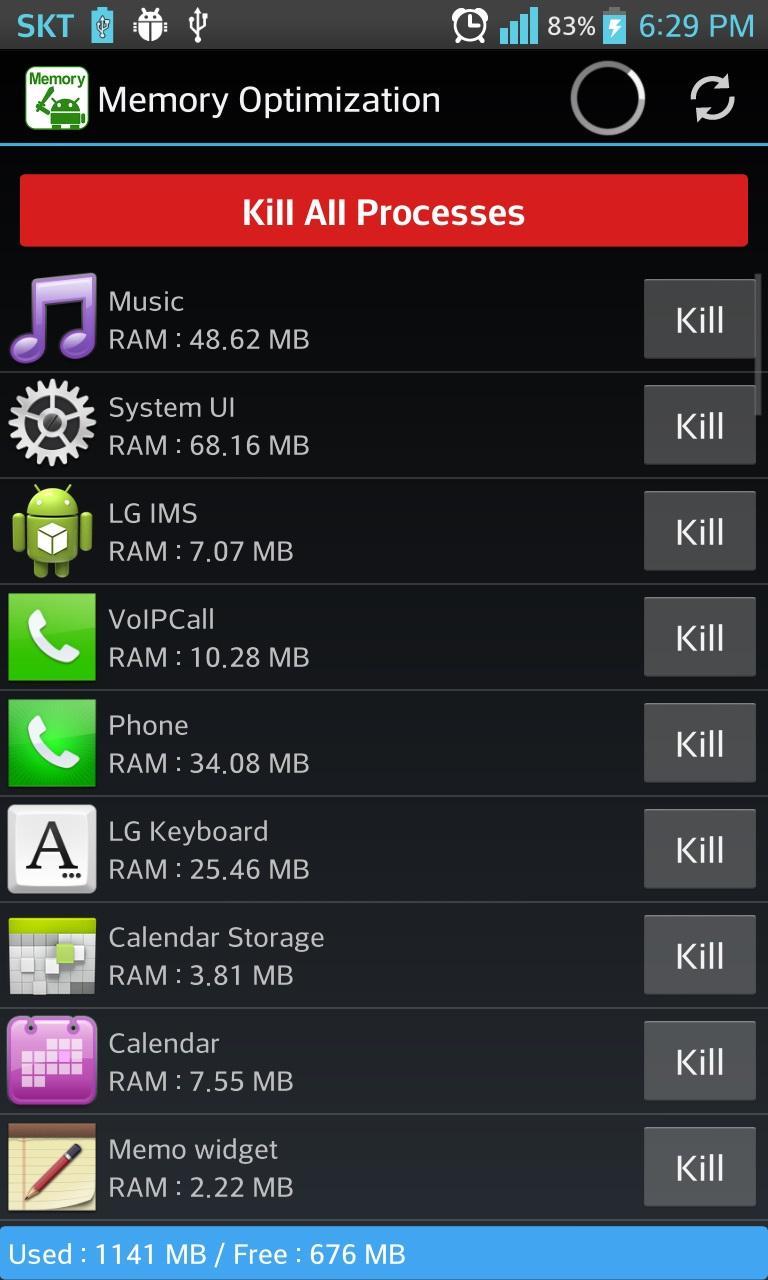
Unlike other memory optimizing apps, so called process killers, "Memory Optimization" shows all processes which consumes memory space.
You can order apps by alphabetically or by amount of memory used via menu.
With alphabetic ordering, you can easily find the apps that you want to check.
With memory usage ordering, you can see what apps use large amount of memory.
If you find some apps that seldom used but take much amount of memory, you would better delete those apps.
Some system apps and service apps will revive even though you try to kill them.
Keep in mind :)
With simple but powerful app "Memory Optimization", you can say goodbye with the slow and crazy battery consuming smartphone.
Latest Version
1.1.1Uploaded by
Imran Ali
Requires Android
Android 4.0.3+
Category
Free Tools AppContent Rating
Everyone
Report
Flag as inappropriateLast updated on Mar 25, 2017
- The app supports over or equal Marshmellow OS ( 5.0 ) but does not support over or equal Nougat ( 7.0 )
- Fixed some crush issues.



APKPure - A multi-platform app store primarily focused on Android, providing extensive app-related content. Discover the app you want easier, faster, and safer, with quick and efficient downloads and installations.





![Auto Optimizer Premium [Trial] APK](https://image.winudf.com/v2/image1/anAuc25vd2xpZmUwMS5hbmRyb2lkLmF1dG9vcHRpbWl6YXRpb24udHJpYWxfaWNvbl8xNjYxMTkyNzIwXzAxMA/icon.png?w=102&fakeurl=1)