Google Tabletop: What the Tabletop AI Experiment Changes for Group Planning

2026-11-12
Google Tabletop builds shared, editable planning pages from a prompt. What the Labs experiment changes, who can try it, and where it still falls short.
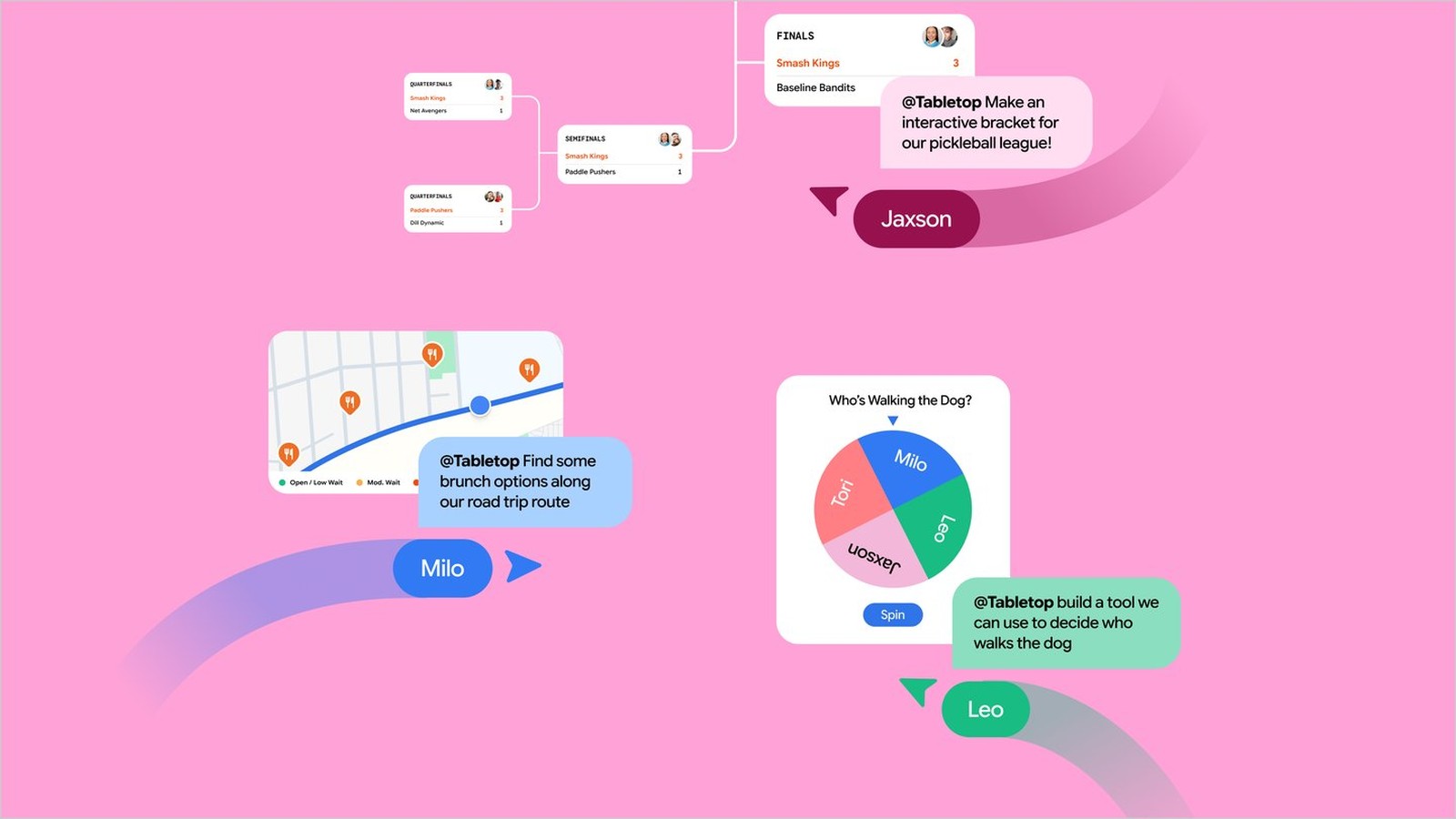
Google Tabletop opened on 11 November 2026 as a Google Labs experiment, and it's the first Google product I've seen that treats a group chat as the starting point rather than an afterthought. You add links, files and ideas to a shared space, type a prompt at @tabletop, and it builds a working interactive page: a trip itinerary, a dinner poll, an expense splitter, a tournament bracket.
That's it. No app to install, no account migration, no new messaging service. The pitch is that coordinating a group is easier when everyone can edit the same thing at the same time, which is the argument Google Docs has been making for fifteen years, applied to the messier problem of plans.
What Google Tabletop actually is
Tabletop is a collaborative workspace where the layout is generated rather than drawn. The company's own description calls it a Google Labs experiment built for real-time collaboration, and the comparison to a Google Doc is deliberate: once your space exists, you drop the invite link in a group chat and everyone edits together.
What it isn't: a chatbot with a nicer skin. A chat assistant answers questions and forgets the thread. Tabletop keeps a persistent artifact that several people can touch at once, and the artifact has structure: dates, options, columns, votes.
The examples Google gives are all small-group logistics. Trip itineraries, dinner polls, expense splitters, tournament brackets. Those are exactly the tasks where a group chat degrades into forty messages and one person doing all the work in a spreadsheet nobody else opens.
How the Tabletop prompt flow works
The workflow is short enough to describe in a paragraph, which is a good sign.
- Create a space and add what you already have: links, files, notes, ideas.
- Prompt @tabletop with what you want built, or pick a starter template if you'd rather not write a prompt.
- Tabletop generates an interactive page with the fields, options and controls that fit the request.
- Share the invite link in your group chat. Everyone opens the same space and edits it live.
The template shortcut matters more than it looks. Most people don't know what to ask for, and a starter template removes the blank-page problem that kills most AI tools on first use.
The prompt half matters for a different reason. Describing what you want in plain language is how you get a savings tracker with the right columns instead of a generic table you then spend ten minutes fixing. That's the generative UI idea in practice: the interface is assembled to fit the request rather than picked from a menu.
Tabletop versus Google Docs and Sheets for group planning
The obvious question is why not just use a Doc. The honest answer is that a Doc is a blank page and a Sheet is a grid, and neither knows what a dinner poll is.
| Task | Google Docs | Google Sheets | Google Tabletop |
|---|---|---|---|
| Trip itinerary | Manual layout | Manual rows | Generated with dates and options |
| Dinner poll | Text list, manual count | Formula setup | Interactive voting |
| Expense split | Table by hand | Formulas | Splitter built from the prompt |
| Tournament bracket | Drawing shapes | Awkward grid | Bracket layout |
| Live group editing | Yes | Yes | Yes |
The pattern is that Docs and Sheets give you a substrate and Tabletop gives you a starting structure. For a one-off plan with four people, that difference is the whole product.
Where Docs still wins is anything long-form. A trip itinerary with paragraphs of notes per day is a document. Tabletop is better at the parts you compare and decide, and worse at the parts you read.
What Google Tabletop means for Android users
This is where the launch is thinner than the announcement suggests. Tabletop is a web experiment. It isn't a Google AI app you download: there's no Android client, no Play Store listing, and nothing to install on your phone. You open it in a browser, which on Android means Chrome. That works, but it means the first taste of generative UI Android users get here is a desktop-shaped product running on a small screen.
That's not a dealbreaker for the use case. Group planning happens in a chat app on a phone, and the invite link opens in the same browser you were already using. The constraint is the editing experience: a prompt box plus a generated layout with multiple columns is cramped at 6 inches, and the person doing the setup will want a laptop.
Google's own rollout details reinforce that. Access is a waitlist, currently limited to the US and to people 18 and over. If you're outside the US, there's no workaround worth trying, because the gate is account-level rather than a download.
Who can try The Google Tabletop waitlist and how
Sign-up is one page: labs.google/tabletop. You join the waitlist and wait, and Google hasn't published a schedule for how fast invitations go out.
Two things about the rollout are worth knowing before you sign up. First, it's a Labs experiment, which in Google's vocabulary means it can change shape or disappear without notice. Second, the 18+ restriction sits oddly against the examples: a family trip or a chore chart usually involves people under 18, and The Verge noted the same tension. Expect the age gate to relax if the experiment survives, but don't plan around it.
For now, joining the waitlist is the entire onboarding. There's no invite code to hunt, no regional store to switch, and no app to sideload.
Limits of Google Tabletop in this first release
The restrictions are real and they shape what the product is good for today.
- US only, 18 and over, waitlisted. For an AI collaboration tool, that's a narrow front door. Everyone in your group needs to be able to open the link, which means the restriction applies to the whole plan, not just the organiser.
- Web only. No Android or iOS app, and no offline mode worth relying on.
- Labs status. Features can change between sessions, and nothing here carries a service guarantee.
- Data in, data out. You're uploading links and files into a Google experiment, so treat the privacy settings as something to check rather than assume, especially for anything with addresses or booking references in it.
- Small screens. The generated layouts are built for a browser window, and the mobile experience is usable rather than designed.
None of that makes it useless. It makes it a tool for one organiser with a laptop and a group of people who only need to vote on a date.
What to watch next in Google Tabletop
The interesting question isn't whether Tabletop works. It's whether Google links it to the places groups already live. An experiment that stays a standalone site will be used by the person who reads Google's blog and nobody else. The same tool inside a shared link from Google Messages or a Calendar event is a different product.
The other thing to watch is whether the generated layouts get good enough to replace the template. Today a starter template does most of the work. If prompting reliably beats the templates, Tabletop becomes a general tool; if it doesn't, it's a small collection of useful widgets.
Either way, this is the clearest consumer example of generative UI so far: not a demo video, not a developer protocol, but a page a family can open and argue over.
The verdict on Google Tabletop
Google Tabletop is worth joining the waitlist for if you organise things for groups and you're tired of rebuilding the same spreadsheet. It turns a prompt into a shared interactive page, and it does it without asking anyone to install anything.
Open labs.google/tabletop and sign up, then try one real plan rather than a test: a dinner, a trip, a league schedule. The experiment either saves you an evening of coordination or it doesn't, and you'll know inside one use.
 NEWS
 REVIEWS
 HOWTO