Google New Developer Verification Rules: What Developers and Users Need to Do
2026-10-14
Google's Android Developer Verification rules take effect September 30, 2026 in Brazil, Indonesia, Singapore, and Thailand. Below, we cover who is affected, what developers and users need to do, how APKPure is responding, and answers to common questions.
On September 30, 2026, Google put its Android developer verification program (Google Developer Verification) into effect in Brazil, Indonesia, Singapore, and Thailand, with all certified Android devices worldwide to follow in 2027 and beyond. Under the new rules, an app on a certified device needs to be linked to a developer who has verified their identity, along with a registered package name.
The goal is to cut down on malware spread through sideloading. Tying every app to a verified developer identity and a registered package name makes that much harder to pull off, and should limit how easily malicious APKs spread outside official stores.
Who Is Affected by Developer Verification
● Developers who publish only through Google Play: largely unaffected. Google automatically registers roughly 99% of apps from developers who have already completed identity verification in Play Console.
● Developers who distribute outside Google Play, including through APKPure and other third-party stores: need to complete verification and register their apps directly, or risk install failures on certified devices.
● Students and hobbyist developers: can apply for a free limited-distribution account. No government ID is required, but distribution is capped at 20 devices.
● General users: the day-to-day install experience stays largely the same, with extra steps appearing only when installing an app from an unverified developer.
How to Verify Google Play Developer Account
For Developers: Steps to Get Verified
If you publish through Google Play, log into Play Console and check your app's registration status. Since Google auto-registers roughly 99% of apps from developers who've already verified their identity there, most Play-connected developers have nothing further to do beyond confirming that status.
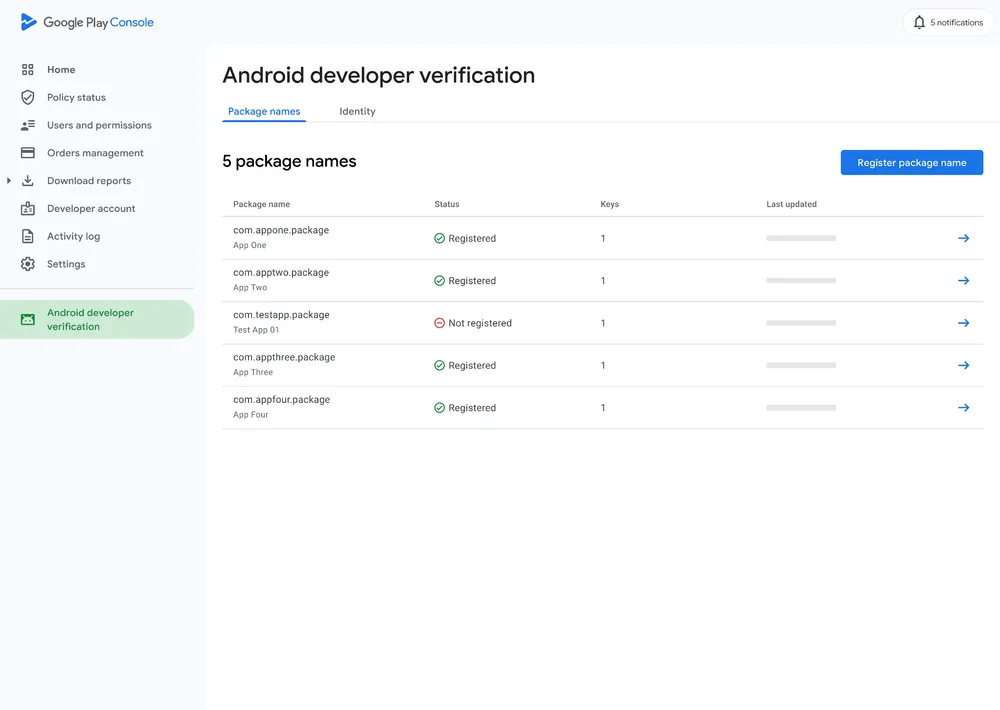
If you distribute outside Google Play and build with Android Studio, head to the Android Developer Console to complete identity verification, then bind your app's SHA-256 signing certificate fingerprint to its package name. That binding is what proves the app is actually yours and stops anyone else from publishing a spoofed version under the same package name.
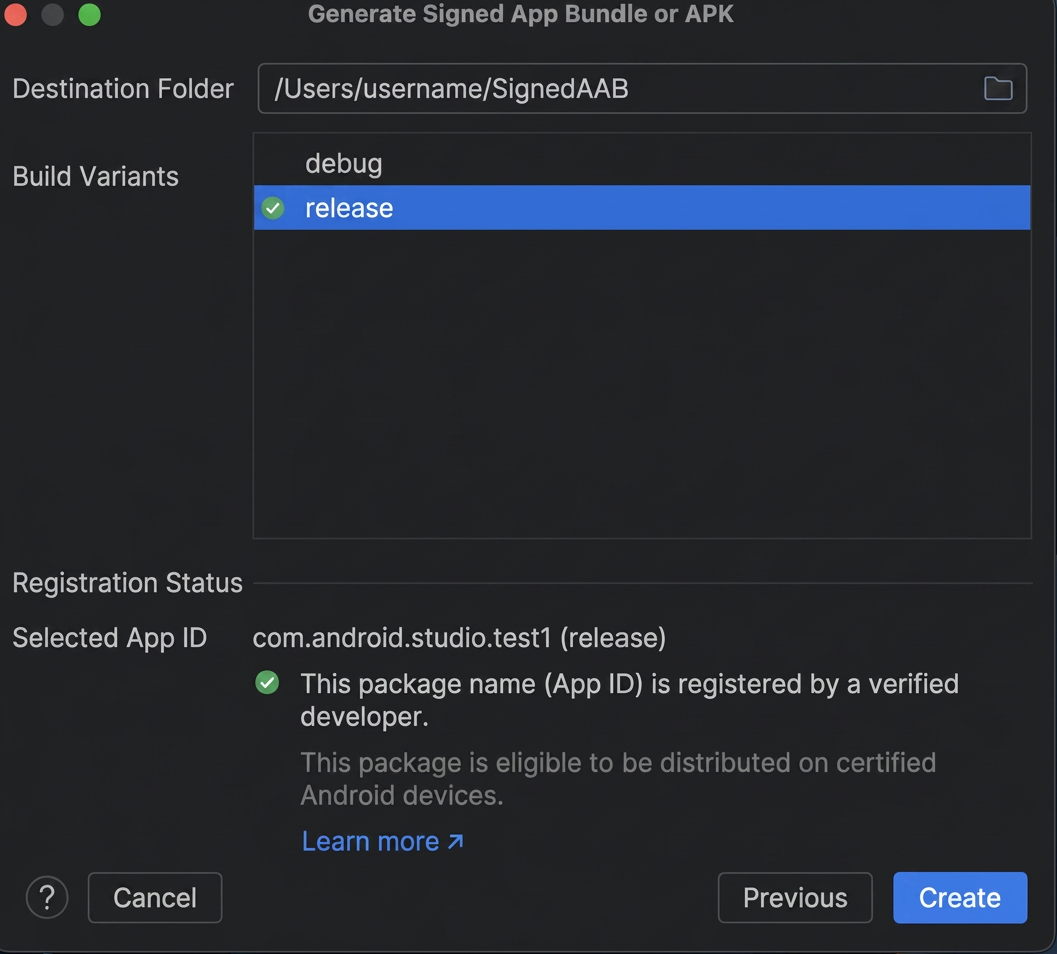
Android Studio now shows this registration status directly when you export a signed APK or AAB, so you can catch anything missing before you ship. Keep in mind that rotating your signing key or changing your package name later means redoing this registration from scratch, so it's worth locking down your signing setup now rather than after the fact.
If you're a student or hobbyist developer, you can skip the full verification process and apply for a free limited-distribution account instead. No government ID is required, though distribution is capped at 20 devices, which works for testing or a small personal project but not for shipping to a wide audience.
For Users: What Changes When Installing Apps
Most developers will complete registration well before their apps are affected, so this isn't going to change the way you install the vast majority of apps you download. The distinction only comes up when a specific developer hasn't finished verification yet.
Apps from registered developers install and update exactly as they do now, with no extra steps.
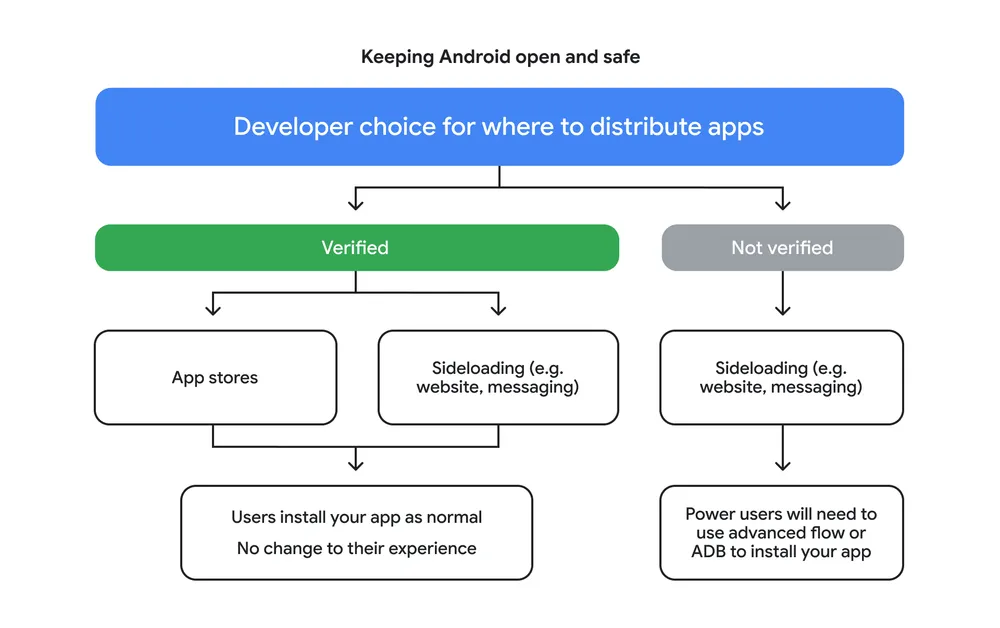
If you do run into an app from an unverified developer and still want to install it, you have two paths open to you, depending on how you're getting the app.
Sideloading from Limited-Distribution Developers
Students and hobbyist developers often register through Google's free limited-distribution option, which caps them at 20 devices but still counts as registration. If you're getting an app directly from a developer you already know or trust, through whatever channel they've chosen to share it, this path typically keeps working without you needing to touch the advanced flow at all.
Using the Advanced Installation Flow
Google built the advanced flow for users who want to keep installing apps from unverified developers. It's a one-time setup, and once it's done, you won't have to repeat it for every future install.
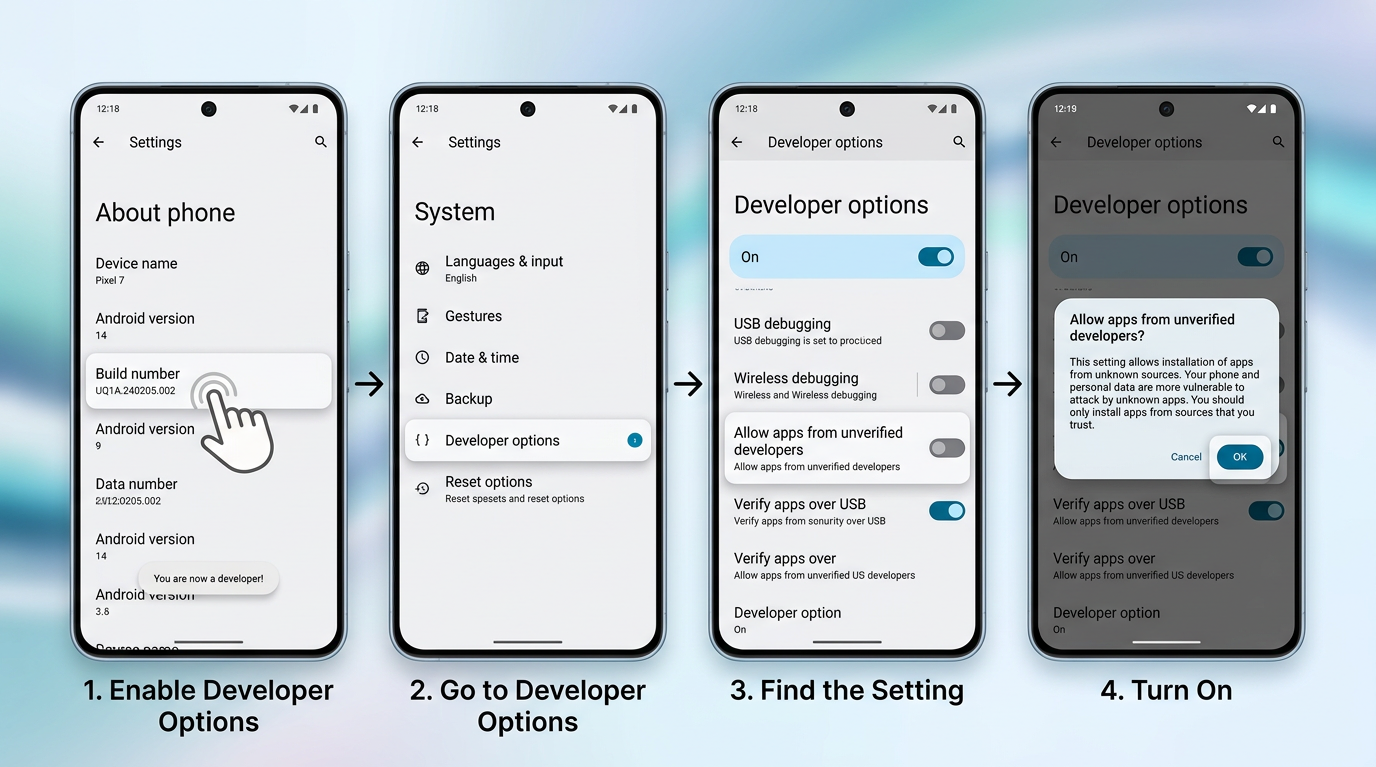
1. Turn on "Allow apps from unverified developers." If you haven't already enabled developer options, go to Settings > About phone and tap the build number seven times to unlock it, then go to Settings > Developer options and turn on "Allow apps from unverified developers.
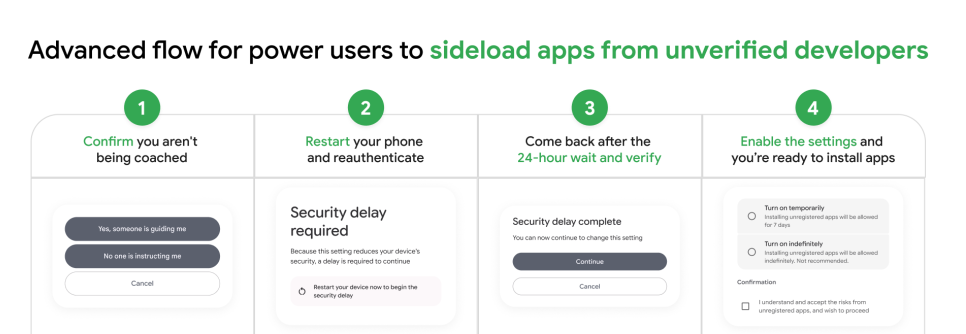
2. Confirm your identity with your screen lock (fingerprint, face unlock, or PIN), and confirm that no one is currently instructing you to enable this setting. This step exists specifically to catch scam attempts, since scammers often impersonate banks or government agencies to pressure people into disabling safeguards.
3. Restart your phone. This cuts off any live call or remote-access session a scammer might be running in the background.
4. Wait 24 hours. This one-time waiting period gives you a cooling-off window so you're not making the change in the middle of being pressured. There's no way to skip it, and changing your device's clock won't shorten it either
5. Return to the same settings page after 24 hours and confirm again to finish. You can choose to enable it for 7 days or indefinitely.
Once set up, installing an app from an unverified developer will still show a warning, but you can just tap "Install anyway" and you're done. You won't need to redo the setup each time.
One thing worth noting: ADB installs aren't affected by any of this. Developers and experienced users installing or testing apps through ADB skip both the advanced flow and the 24-hour wait entirely.
How is APKPure Responding to Google Developer Verification?
A large share of the apps hosted on APKPure are also published on Google Play, and those developers are already covered by Google's automatic registration once their identity is verified in Google Play Console. The remaining apps, distributed only outside Google Play, are the ones that need to complete registration directly.
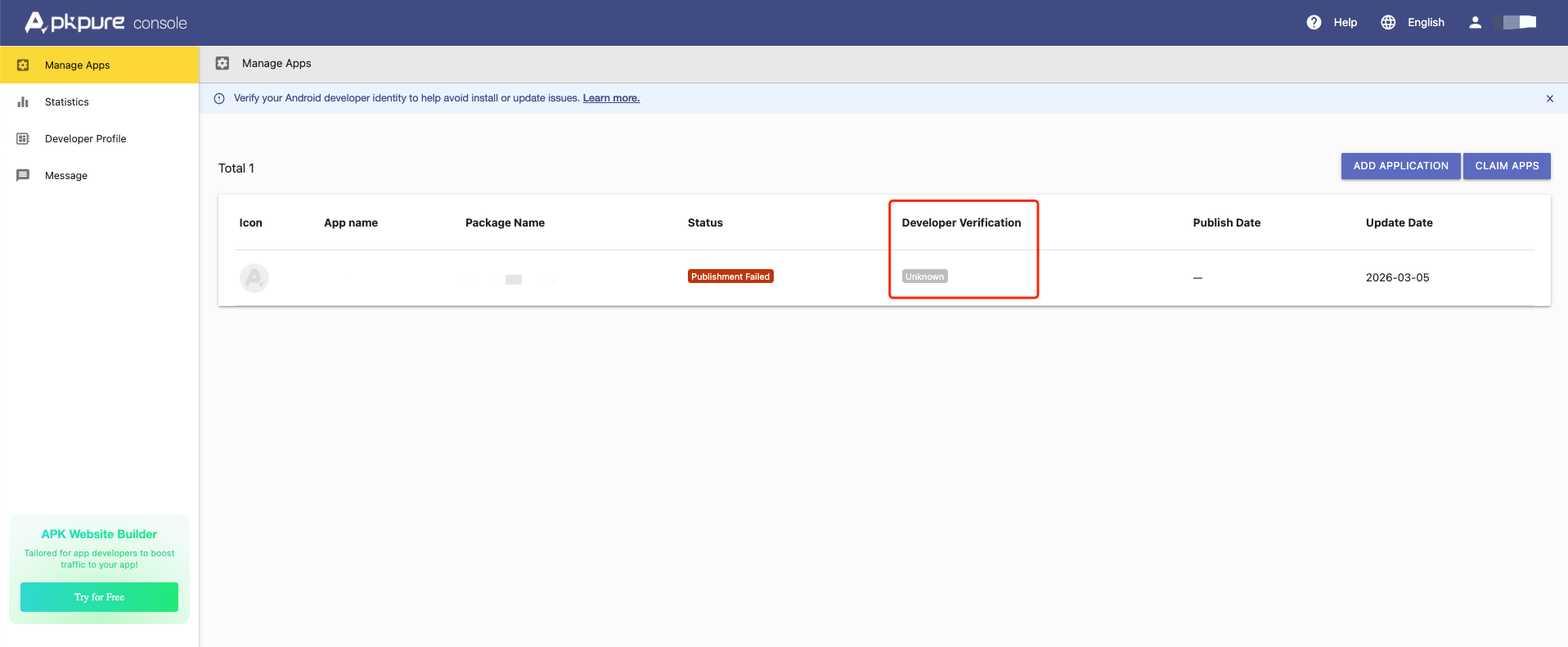
To make the status easy to check, we've added a Google developer verification field to the APK info page and to the APKPure Developer Console. Once your verification is complete, we will display "Verified". If it displays "Not Verified" or "Unknown", please follow the steps for your developer type in the guide above and complete verification.
Where APKPure Stands
We support the underlying goal of this policy: making it harder for anonymous developers to repeatedly push malicious apps under new identities is a reasonable step, and it benefits both developers and users.
At the same time, we recognize this adds real work for developers who've relied on third-party distribution. We'll be tracking how the rollout actually plays out and updating our guidance on APKPure as things develop, with the goal of keeping this transition as manageable as possible for everyone involved. If you have questions about how this affects your app or your downloads, get in touch with our team.
FAQs
Can I complete Google verification through the APKPure Developer Console?
No. The APKPure Developer Console only displays the status reported by Google. It uses the Android Developer Status API to check whether your app’s package name is registered to a verified developer. You must complete developer verification in Google Play Console, not on APKPure.
Why does my verification status show "Not Verified" or "Unknown" even though my APKPure account email is verified?
Verifying your APKPure account email only confirms ownership of your email address. It does not affect your Google developer verification status. To be shown as “Verified,” you must complete identity verification and app registration with Google. Make sure the registered package name and signing certificate match those of the app you publish. See the guide above for instructions.
Do I need to complete developer verification before uploading a new app to APKPure?
No. You can upload a new app to APKPure regardless of your developer verification status. However, we recommend completing verification because, without it, your app may be blocked from installation on certified Android devices in countries where Google’s verification requirements apply.
Is a "Failed to upload" error related to the "Not Verified" status?
Usually not. A Not Verified status doesn't block uploads, so a failed upload most likely comes from something else in the file or the submission. If the error keeps appearing, contact us with the app's package name, the version you're uploading, and a screenshot of the error message so we can find the exact cause.
Can I publish more than one app under the same developer account?
Yes, and adding a new app doesn't affect the ones you've already published. Google verifies your identity once per developer, but each app needs its own package name registered with its signing certificate. So for every new app, check that it's registered as well.

 NEWS
NEWS REVIEWS
 HOWTO
HOWTO