Scan Date:May 20, 2026
Show More

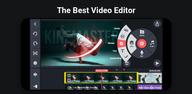
KineMaster focuses on fast editing on phones and tablets. It brings a full-screen timeline, touch-friendly controls, and professional results for creators who publish to YouTube, TikTok, Instagram, and Facebook. The editor combines AI-assisted tools with an easy start experience using ready-made templates and assets. Therefore, you can move from capture to publish without switching devices. Moreover, the workflow supports high-resolution exports and cloud backup, so projects remain accessible across devices. Download KineMaster latest version on APKPure to start editing with dependable tools that fit a mobile workflow.
Start fast with templates and Mix
KineMaster offers thousands of templates that you can preview, apply, and personalize. You simply replace clips, texts, and music, then publish. In addition, you can share your own templates with the Mix community to speed up future projects.
AI toolkit for captions, voices, and cleanup
KineMaster uses AI to automate common tasks like auto captions and text-to-speech. You can apply AI voices, remove backgrounds with Magic Removal, and use noise and vocal separation to clean audio. Moreover, AI tracking and upscaling help refine visuals with less manual work.
Precise editing controls
You get keyframe animation for movement and transforms, plus chroma key for green screen work. Speed controls, reverse, and detailed color adjustments give scene-by-scene control. Also, color filters help you match a consistent look across shots.
Full mobile timeline workflow
The KineMaster app provides a multilayer timeline with magnetic guides for easy alignment. You can edit in portrait or landscape and preview in full screen for accurate framing. Furthermore, multiple undo and redo steps let you explore ideas without risk.
Asset Store built in
The Asset Store includes effects, transitions, stickers, fonts, music, sound effects, and stock videos and images. You can search, filter, and add assets directly to your project. Therefore, your library grows as you discover styles that match your channel.
Export and cross-device workflow
Exports support up to 4K at 60 FPS, along with social-ready presets for quick publishing. Transparent background export helps motion graphics and overlays fit any edit. In addition, KineCloud enables project backup and cross-device editing when you switch phones or tablets.
KineMaster is free to download and use with ads and a small export watermark. KineMaster Premium removes ads and the watermark, and it adds 10 GB of KineCloud storage for project sync. In addition, one KineMaster Premium subscription also includes Spring Premium, which gives access to the companion Spring app.
KineMaster does not have a native Windows or Mac version. Some users run the mobile app on a computer using an Android emulator, although this method is not officially supported. For the best experience, create and export on a phone or tablet, and download KineMaster APK latest version on APKPure if you want to try it with an emulator at your discretion.
The Mix community lets you post templates built from your edits so others can reuse the structure with their own clips. This helps you standardize brand intros, lower thirds, and series formats. Moreover, KineCloud keeps project files available on multiple devices, so you can capture on one phone, fine-tune on another, and publish without moving media manually.
This quick guide shows the core steps to create a short video using KineMaster. You can follow the same flow whether you start with a template or a blank project.
Open KineMaster, tap New Project, choose an aspect ratio, and name your project for easy tracking.
Import your main clips and photos from your device gallery, then arrange them in the timeline in the order you plan to tell the story.
After that, trim each clip by dragging the edges, split where needed, and use the magnetic guides to keep cuts aligned to beats.
Add text, stickers, or transitions as needed, then use audio tools to add music and adjust levels so dialogue is clear.
Then apply color adjustments or a filter, generate captions with AI if needed, preview in full screen, and export using a social preset or 4K at 60 FPS.
KineMaster provides mobile editing that is quick to learn and precise enough for consistent publishing. Download KineMaster APK latest version on APKPure to edit, add captions, and export in high quality with a phone-first workflow.
Official resources and support:
Website: https://www.kinemaster.com/
Email: support@kinemaster.com
Is KineMaster free to use?
KineMaster is free to use with ads and a watermark on exported videos. KineMaster Premium is a paid upgrade that removes ads and the watermark, and it adds 10 GB of KineCloud storage. The Premium plan also includes Spring Premium in the same subscription.
How do I remove the KineMaster watermark?
The watermark is removed when you subscribe to KineMaster Premium. Free exports include a watermark, and there is no official setting to remove it without Premium. For legal and stable results, upgrade inside KineMaster and export again.
Is there an official KineMaster for PC?
KineMaster does not offer a native Windows or Mac app. You may run the Android version on a computer with an emulator; however, this setup is not officially supported by KineMaster. For the most reliable performance, use KineMaster on a phone or tablet and download KineMaster APK on APKPure.
Latest Version
8.1.10.36524.GPUploaded by
Cesar Geovanny Lopez
Requires Android
Android 8.0+
Category
Free Video Players & Editors AppContent Rating
Everyone
Security Report
Report
Flag as inappropriateLast updated on May 20, 2026
Text UI Overhaul: Input, revise, style, and format directly on the Preview screen
New Text Animation: Word-by-word



APKPure - A multi-platform app store primarily focused on Android, providing extensive app-related content. Discover the app you want easier, faster, and safer, with quick and efficient downloads and installations.