How to Play Indian Vehicles Simulator 3d on PC
2023-06-07
Realistic Indian vehicles game with customization, tochan mod and various maps. Learn how to download and play Indian Vehicles Simulator 3d on PC from this guide.
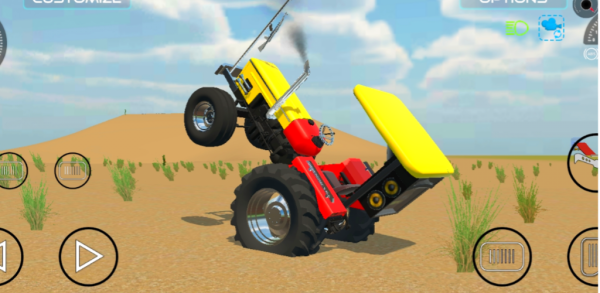
Get ready to experience the most realistic Indian Vehicles game ever with Indian Vehicles Simulator 3D! This exciting game is packed full of features that will keep you entertained for hours on end. With its Tochan Mod (Tug of War), all vehicle customization, one-side brakes and color-changing options, there's something here for everyone. You'll love being able to modify your favorite vehicle from a range including cars, bikes, tractors or even DJ trucks. Change up everything from the tires to the bodywork and get it looking just how you want before taking it out onto any one of four maps - City Map; Offroad Desert Map; Beautiful Terrain Map & New Village Map! But this isn't just about customizing vehicles – try your hand at driving an airport crane or bus too! And don’t forget about our latest addition: The Airport map where players can drive their favorite planes around as well! The stunning graphics combined with smooth controls make every turn feel like real life on India’s roads whilst playing through different terrains makes sure no two games are alike! Download now and enjoy countless hours exploring these amazing environments while having fun experimenting with new ways to customize each ride! Plus many more vehicles coming soon so stay tuned!"
Indian Vehicles Simulator 3d is a driving sandbox game that recreates Indian roads and culture.
Why do people enjoy playing Indian Vehicles Simulator 3d on PC?
There are several reasons why people may prefer to play games on PC rather than on mobile:
Enhanced Graphics and Performance: PCs generally possess more robust hardware components compared to mobile devices, enabling superior graphics and increased frame rates. This can contribute to a more engaging and enjoyable gaming experience.
Modding and Customization: PC games often allow for modding and customization, which can add new content, features, and experiences to the game.
Advanced Controls: PCs usually come with more precise input devices, such as keyboards and gaming mice, offering improved control and responsiveness over touchscreens.
Broader Game Selection: Despite the increasing popularity of mobile games, the PC gaming market continues to provide a more extensive array of games, featuring more sophisticated and in-depth titles.
Bigger Screen: PC monitors are usually larger than mobile screens, making it easier to view and engage with game elements.
How to Play Indian Vehicles Simulator 3d on PC?
To enjoy Indian Vehicles Simulator 3d on your computer, you'll need to install an Android Emulator like Gameloop, which simplifies the process of setting up, launching, and running mobile games on your PC. Follow the instructions below to learn how to download and play Indian Vehicles Simulator 3d on your computer using the Gameloop Android emulator.
Step 1: Download Gameloop on your PC
Click here to download the Gameloop Android emulator installer. After the installation is complete, launch Gameloop on your computer.
Step 2: Search and Install Indian Vehicles Simulator 3d on Gameloop
Search for Indian Vehicles Simulator 3d on Gameloop, and click the "Install" button next to the game.
Indian Vehicles Simulator 3d is a driving sandbox game that recreates Indian roads and culture.
Step 3: Launch Indian Vehicles Simulator 3d on Gameloop
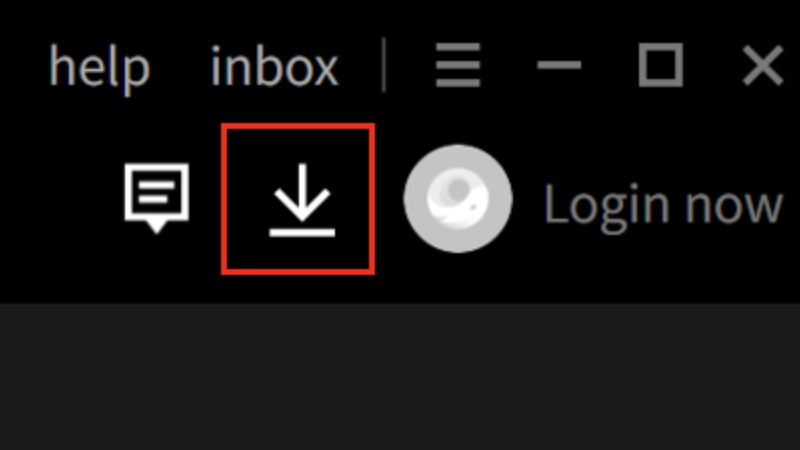
Once Indian Vehicles Simulator 3d is installed on Gameloop, click on the download icon in the upper right corner to see the installed list. Find Indian Vehicles Simulator 3d and click on the Open button to launch the game.
Step 4: Play Indian Vehicles Simulator 3d on PC
After granting necessary permissions, begin playing Indian Vehicles Simulator 3d on your PC using the Gameloop Android Emulator.
Note: If this is your first time launching a game on Gameloop, the emulator will request certain permissions. Accept all permissions to enjoy the game on your PC.
Minimum Requirements
To play Indian Vehicles Simulator 3d on PC with Gameloop, you have to meet the following minimum system requirements:
- OS: Windows 8.1 64-bit or Windows 10 64-bit
- GPU: GTX 660
- CPU: i3-9320
- Memory: 8 GB RAM
- Storage: 20 MB available space
In addition to Indian Vehicles Simulator 3d, APKPure has a plethora of other popular mobile games waiting for you to explore! Don't forget, you can also enjoy a more thrilling gameplay experience on your PC.
- How to Download Garten of Banban 0 on PC
- How to Download Naruto Mugen on PC
- How to Download NINJA GAIDEN 2 Black on PC
 NEWS
NEWS REVIEWS
 HOWTO
HOWTO