
This app is useful if you want to update your Process Gapps or you get the error message: Unfortunately, Process Gapps stopped
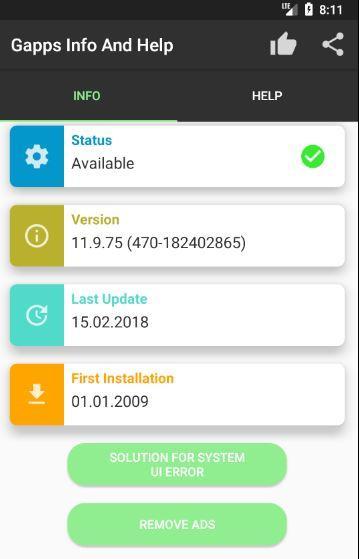
It informs you about the status of your current installed version of the Process Gapps and shows you four different step by step text and video tutorials of how to fix this error.
In fact, that the source of error depends on the different android version and devices, the process to solve the error is different, too. The videotutorials will help you.
All videos are for free and can be viewed unlimited times. If you click on the button - play video - a dialogbox will be shown which contains the video.
If you want to end the video, easily click on the back button or on a place where the video is not playing.
Construction of the app Unfortunately, Process Gapps stopped
Totally there are three different tabs which contains all available functions:
Info:
Here you can find all important information to your installed Process Gapps . If your version is outdated or has errors, then you will notice here finally.
"What should i I do now?"
If you want to update your Process Gapps because they are outdated then do following:
Change to Tab Download. Here you can find five different Buttons, which links you to different download sites.
I recomment the download to update your Process Gapps directly through the Google Play Store .
Click on the first button and install the viewed Goolge Play services
After that, switch to Tab Info and check if the version was updated and status shows: successful.
If you do not want to update the Process Gapps , rather following error message is shown:
Unfortunately, Process Gapps stopped then switch to the second Tab Help. Here you read the step by step tutorials or play the videotutorials which leads you to the solution. in the video i show you exactly what you should do to avoid getting the error message Unfortunately, Process Gapps stopped , anymore.
Download
If you want to update your Process Gapps you can download the current version here. The different links are just for safety. if one does not work, you have the opportunity to update Process Gapps from another link.
Help:
Here you will get Step by Step Text- and Videotutorials which explains you how to fix the error message Unfortunately, Process Gapps stopped. The different videos refer to different types of error sources, which depends on different android devices and versions.
The videotutorials refer to following sections:
Videotutorial 1:
Google Play Store
Videotutorial 2:
App settings
Videotutorial 3:
Account settings
Videotutorial 4:
Process Gapps
To play a video, just tab on play video button in Tab Help
Latest Version
1.2Uploaded by
Zane Yoku
Requires Android
Android 4.1+
Category
Free Tools AppContent Rating
Everyone
Report
Flag as inappropriateLast updated on Jun 22, 2018
Gapps Performance optimization



APKPure - A multi-platform app store primarily focused on Android, providing extensive app-related content. Discover the app you want easier, faster, and safer, with quick and efficient downloads and installations.