
Vanced MicroG helps users on custom ROMs or devices that do not include Google Play Services run apps that rely on Google account login and sync. It replaces key service hooks so you can access account features while keeping control over background activity. As a lightweight component, it is commonly paired with ReVanced apps for everyday use. If you plan to download Vanced MicroG, check whether your apps specifically need Google sign-in before installing.
Google login and sync for ReVanced apps
Vanced MicroG enables sign-in with a Google account in YouTube ReVanced and similar clients. After login, supported apps can read and update history, subscriptions, and basic account data. This allows familiar account behavior without installing the official service package.
Opt-in component control
You can decide which parts run, including sign-in, notifications, and cloud messaging. Components stay inactive until enabled, which helps limit background activity. As needs change, adjust each toggle from the settings panel.
Location via UnifiedNlp backends
Vanced MicroG offers location services through configurable providers that work online or offline. Choose backends that fit your use case, then enable them when an app requests location. This approach avoids the full Google location stack while keeping essential functionality.
Lightweight resource usage
MicroG is designed to run with minimal memory, CPU, and battery impact. Background tasks are reduced, so the device remains responsive. This is useful on older phones and custom ROMs where efficiency matters.
Wide compatibility and builds
Vanced MicroG works on real devices, common Android emulators, and virtual mobile environments. For certain models, a Huawei-focused build and the MicroG RE variant can improve compatibility. When issues arise, testing a current build often resolves login or sync problems.
MicroG is essential for enabling Google account login and sync in YouTube ReVanced and other ReVanced clients. To simplify installation and updates, many users manage both MicroG and their clients through ReVanced Manager. Not all advanced features are supported, and some apps may still require the official implementation for specific functions, so testing your core apps is important. If you are looking for Vanced MicroG APK download options, select the build suited to your device and update when older versions stop working.
Vanced MicroG targets a broad range of Android versions and works on standard devices and emulators. To reduce background activity, enable only the services requested by each app, then revisit settings if behavior changes. For Huawei devices or cases where login fails, consider the dedicated Huawei build or MicroG RE to improve compatibility. If you need a MicroG download for testing, check release information and verify that your dependent apps connect as expected.
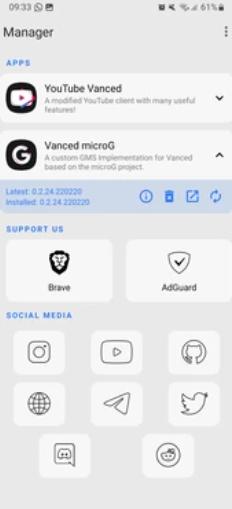
This guide covers a typical setup with YouTube ReVanced on a phone. For convenience, many users install MicroG and their client through ReVanced Manager. If you already have the Vanced MicroG APK, follow the steps below to complete sign-in and sync.
Install Vanced MicroG on your device, then open its settings to review available components.
Grant requested permissions, then keep components disabled until an app needs them to function.
Install or update your ReVanced app with ReVanced Manager, open the app, and start the Google sign-in when prompted.
Return to MicroG settings and enable only the needed services, such as cloud messaging for notifications or location backends if your app requests location.
Go back to the dependent app and confirm that login, history, and subscriptions sync correctly. If something fails, update MicroG and retry.
Vanced MicroG provides the core sign-in and sync support many users need on devices without the official services, with opt-in controls to manage background activity. For stable behavior, keep your setup current with the Vanced MicroG latest version and update your ReVanced apps as needed.
Latest Version
0.3.13.3.250932-hwUploaded by
ReVancedTeam
Requires Android
Android 4.4+
Category
Free Tools AppReport
Flag as inappropriateLast updated on Jul 4, 2026
This release includes minor bug fixes and general improvements. Update to the latest version for the best experience.




APKPure - A multi-platform app store primarily focused on Android, providing extensive app-related content. Discover the app you want easier, faster, and safer, with quick and efficient downloads and installations.